Link Query Language
This section describes the Link Query Language (LQL), which is used to define relationships between workflow components. Each link is a one-directional connection propagating data from input to output.
Query structure
Each LQL query has the following high level structure:
NAME(FLAGS?):PATH
NAME is the mandatory LQL query name used by controllers to retrieve results.
FLAGS is an optional comma-separated list of flags:
- The
optionalflag indicates that creating a link matching this query is not required - The
callflag, used in funccall actions, specifies that the FuncCall itself should be matched and returned instead of a script I/O - The
templateflag is used in template queries
PATH is a mandatory path, where items are delimited by /. For
example, assuming its data link input:
value(optional):myworkflow/subworkflow/script/input1
This query is named value and is optional. myworkflow is workflow
id, that is a direct descendant of the workflow where the link is
defined. subworkflow is a direct child of myworkflow. Since it is
a data link, which targets script io, the last two item must be script
and script io, in this example script id script and io name is
input1. Links are allowed to match relatively nested items, so
absolute paths with leading / are forbidden. The example above is an
abbreviated form for the following:
value(optional):first(myworkflow)/first(subworkflow)/first(script)/input1
Meaning that the first item with the provided id will be matched. So
by default first selector is used.
Plain selectors
All plain selectors support matching multiple ids via or. For
example, first(script1|script2) will match the first item with id
either script1 or script2.
The following plain selectors are available:
first
Matches the first item with provided IDs among direct descendants.
last
Matches the last item with provided IDs among direct descendants.
all
Matches all items with provided IDs among direct descendants.
expand
Functions similarly to all for matching, but is exclusively used in base paths. Generates multiple link instances (one per match).
Reference selectors
These selectors are required for a link to have a
base path. A special expand selector is available
for base queries. Selector expand is working like all in terms of
matching, but has a special meaning. For each match a separate link
instance will be created (provided all other queries are matching as
well). Each link instance will be triggered separately and pass data
only from its own matched inputs to own matched outputs. Reference
selectors are using @ base query name as the first argument, and id
list as the second.
For example, here is a part of link definition with base and reference selectors:
{
  id: "mylink1",
  base: "base:expand(workflow1|workflow2)/expand(script1)",
  from: "in:same(@base,workflow1|workflow2)/same(@base,script1)/output1"
  to: "out:same(@base,workflow1|workflow2)/after+(@base,script2)/input1"
}
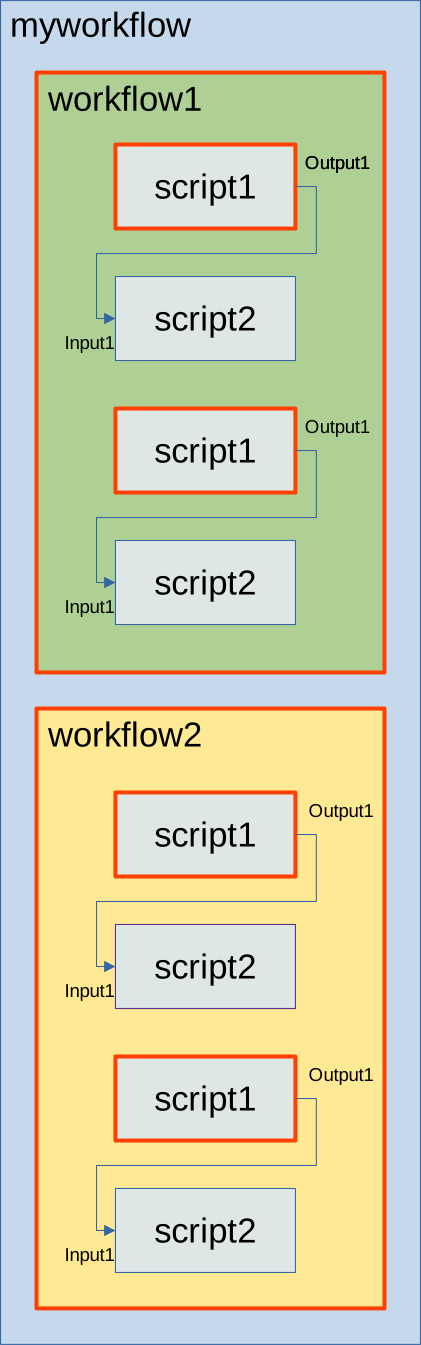
In this example (assuming that mylink1 is defined directly in
myworkflow), the first segment expand(workflow1|workflow2) matches
both workflow1 and workflow2. The second segment of the base path
expand(script1) is matching script1, and there are 2 matches inside
each workflow, so 4 script1 items are matching. All base path matches
are colored via a red border. Note that base queries target
scripts or workflows, not script IO.
The next step is to use this base path matches to create mylink1
instances. The first segment of both from and to paths
same(@base,workflow1|workflow2) matches the same workflow1 and
workflow2 as the base path. For from path the second segment
same(@base,script1) matches again the same nodes as the
base. However, for to path after+(@base,script2)/input1, it matches
next adjacent script2 (relative to base path script1 match). There are
4 matches, so four link mylink1 instances are created. If the last
script2 is removed, there will be 3 links, since there will be no more
matching next adjacent script2 for the last script1.
Here is a list of reference selectors:
same
Matching same item as in the link instance base path.
before
Matching the first preceding item with any of the specified IDs before the link instance base path.
after
Matching the first following item with any of the specified IDs after the link instance base path.
modifiers
For before and after special suffixes are
available. * forcing to match all items, and + forcing to match an
adjacent item, both in the direction of a selector.
Additionally, before and after selectors accept a third parameter called "stop IDs". When matching encounters any ID from this list (in the respective selector's direction), the matching process stops.
Tag selectors
All selectors can use tags instead of IDs for
matching (including expand in base query), by using the #
selector prefix. Unlike ids, tags lists are matching using and,
since it is possible to define multiple tags on the same script node
or workflow. Also tags could be used to match items on different
nested levels.
For example:
#first(tag1&tag2)
Will match the first item that has both tag1 and tag2, regardless of how deeply it is nested. The order is defined by depth first traversal.
It is also possible to combine tag and id selector in the same query:
#all(tag1&tag2)/last(script1|scirpt2)/input1
Will match all items with both tag1 and tag2 first, regardless of how deep they are nested, and then match last child item that has id script1 or script2.
Note that you can match only nested items. Tags that are higher in the tree than a link definition will not be matched.
Template queries
When you need to pass multiple I/O items from one script to another, you can use templates. For example:
{
  from: ["in_output1:myworkflow/subworkflow/script1/output1", "in_output2:myworkflow/subworkflow/script1/output2", "in_output3:myworkflow/subworkflow/script1/output3"]
  to: ["out_input1:myworkflow/subworkflow/script2/input1", "out_input2:myworkflow/subworkflow/script2/input2", "out_input3:myworkflow/subworkflow/script2/input3"]
}
Could be written as
{
  from: "in_(template):myworkflow/subworkflow/script1/output1|output2|output3"
  to: "out_(template):myworkflow/subworkflow/script2/input1|input2|input3",
}
Template option basically creates multiple queries that only differ in
script io part, and in templates it is possible to use | for script
io. All other path parts cannot use template expansion. The name of
the query will be just a query template name and a script io name.
Also it is possible to use _(template) for an empty prefix.