FAQ
Quick reference
Drug design and discovery
Q: Can Datagrok handle multiple complex data types in one interface?
Datagrok allows access to many different and complex data types in a single user interface, supporting use cases like DMTA and other integrated chemical and assay data workflows. See Example: Complex data types in one user interface
Q: Can Datagrok support visualization and analysis for different biological and chemical modalities?
Datagrok supports multiple modalities, including:
- Small molecules, see Cheminformatics
- Peptides with HELM notation, see Bioinformatics
- Antibodies, see Bioinformatics
Q: What advanced molecular analyses does Datagrok support?
-
Chemical structure analysis:
-
Biological sequence analysis:
-
Predictive modeling and ADMET:
Q: Can Datagrok handle chemical mixtures?
Yes. Datagrok automatically detects mixtures in the Mixfile format
and displays them directly in grid cells. Clicking a mixture shows its
components in the Context Panel, including structures and component
quantities or ratios from the Mixfile. The Context Panel also lets you
explore mixtures in table or tree views.
Exploring chemical data | Supported info panes
Q: Is there a sample dashboard for chemists?
- This dashboard has multiple visualizations, including chemical spreadsheet, multiple scatterplot views, R-groups, and molecule cards
- This DMTA spreadsheet shows multiple modalities in one view
- The Demo App showcases common analyses like MMP or chemical space, and how they look in Datagrok
Q: Is there a sample dashboard for biologists?
The Demo App showcases common analyses like sequence space or Peptide SAR, and how they look in Datagrok.
Assays, plates, curves
Q: Does Datagrok support compound-centric and assay-centric data views?
Yes. Datagrok supports both:
- Compound view (compound-centric): multiple endpoints per compound
Chemically aware viewers | Example: rich chemical dataset - Table view (assay-centric): multiple compounds in a table with configurable endpoints
Table view | Forms
Users can configure coloring, highlighting, and switch between compounds as rows or columns, and filter, search, and sort the data.
Common actions | Substructure search
Q: How can I ingest raw assay data into Datagrok?
Raw data can be ingested through multiple channels, including drag-and-drop, file shares, database connections, OpenAPI, and integrations with services like Benchling or Revvity Signals. Datagrok is developing a Plates application to support predefined plate templates, batch ingestion, and integrated analysis in one place.
Q: How can I perform curve fitting, normalization, QC calculations from raw assay data in Datagrok?
The Curves plugin provides a complete workflow for converting raw assay data into fitted curves with QC calculations. It transforms well-level assay data into fitted dose–response curves, supporting functions such as 4PL and sigmoid, and can be easily extended to additional analyses, including Km/Vmax, dose ratio, melt curves (DSF Tm), and qPCR, by defining the corresponding functions and parameters.
For modeling dynamic systems, see the Diff-Studio plugin that allows users to solve sets of differential equations interactively through an intuitive UI and a declarative approach.
Q: Can Datagrok visualize dose-response curves for multiple compounds?
Datagrok supports visualizing DR curves for multiple compounds simultaneously and allows plotting curves using custom equations and parameters on the fly (e.g., 4-parameter curve fit over a 10-point dose-response).
Multicurve viewer | Use case for assay plates and DRC
Deploy
Q: How is Datagrok deployed?
Datagrok supports Docker, Kubernetes, on-premises, and cloud deployments (AWS, GCP, Azure).
Learn more about Deployment
Q: What are the end-user computer and browser requirements?
Datagrok runs completely in the browser. There is no need to install any additional software. Datagrok is compatible with modern browsers, including Chrome, Edge, and Safari.
Q: How is logging and monitoring handled?
Datagrok sends logs, audit events, alerts, and a heartbeat to Amazon CloudWatch, Google Cloud Logging, or any OpenTelemetry collector (see Export logs). Health endpoints report the status of every service, and Usage Analysis shows user activity, errors, and server metrics. See Monitor the platform.
Q: How are backups and restores managed?
AWS provides automated RDS and S3 backups; RDS can also be restored as a standard PostgreSQL database.
Q: What is the disaster recovery strategy?
High availability is supported via Docker and AWS clusters that automatically
restart failed instances.
See Disaster recovery demo for more information.
Access
Q: What data sources can Datagrok connect to?
Datagrok connects to any data source, including databases, file storage systems, web services and APIs. The platform supports 50+ file formats, including domain-specific like SDF, FASTA, and others.
Q: Can I connect Datagrok to BigQuery or other data stores?
Yes. Datagrok connects to BigQuery and most other popular databases out of the box. In addition, any machine-readable data source can be easily integrated.
Q: Can Datagrok accommodate users with different levels of experience for query creation and usage?
Yes. Power users (e.g., modelers) can create or edit queries and share them with their teams, while light users (e.g., experimentalists) can use these queries directly without creating or maintaining them. See Working with queries and Scripting.
Q: Can users create data queries in Datagrok without prior knowledge of data sources, structures, or SQL?
Yes. Users can build queries using the Visual Query Editor or the AI Query Builder.
Q: Can we connect our own OpenAI or enterprise LLM to the AI Query Builder?
Yes. You can use your own API key or token. The AI assistant uses database schema, existing relations and user set comments to iteratively generate SQL queries based on user prompts.
Q: Can data queries in Datagrok be exported for storage, sharing, or reuse?
Yes, see Sharing query results.
Q: Can users access data in real-time with responsive performance in Datagrok?
Yes. Users can access data in real-time, and the UI loads data quickly. Dynamic dashboards enable interactive exploration.
Q: How do I find out which databases and files I already have access to?
Open Browse. Databases lists every connection shared with you, Files lists file shares, and Spaces lists team content. Anything missing hasn't been shared with you yet. See Browse.
Govern
Q: Do you follow secure development standards and industry best practices?
Yes, we adhere to secure development and industry best practices across infrastructure, development, and enterprise security:
-
Security-first infrastructure – designed with security from the ground up. Features include secure credentials management, flexible authentication (OAuth, SSO, Active Directory), and role-based access control.
Learn more | Authentication & authorization | Role-based access -
Quality assurance – automated vulnerability scanning (Google Cloud Artifact Analysis for images, CodeQL and Grype for code, published openly as VEX) and multi-layered testing including unit, integration, UI, and performance tests.
Learn more | Testing -
Secure development lifecycle – CI/CD pipelines enforce automated build, test, and security checks; semantic versioning; and secure credential management.
Learn more | Version control | Credential management
Governance & access
Authentication & authorization
Q: How does Datagrok handle authentication and authorization?
Datagrok uses role-based access control and integrates with enterprise identity providers such as LDAP, SSO, and OAuth. Learn more about access control
Q: Is data in Datagrok restricted to users with proper permissions?
Yes. Data is accessible only to users with appropriate permissions, supporting cross-project access and differentiation between internal and external (CRO) users. See User permissions and Authorization.
Q: Does Datagrok support multi-factor authentication (MFA)?
Yes. MFA is supported and enforced at the identity-provider layer — in the managed SaaS platform via Datagrok's managed Keycloak, and in customer-hosted deployments via the customer's own identity provider (OpenID Connect/SAML). In customer-hosted deployments, MFA enforcement is configured by the customer.
Data privacy & usage
Q: What happens to my data when I open a local file in Datagrok?
When you open a local file in Datagrok (like dragging and dropping a file to your browser), you can analyze it without saving. This data stays in your browser's memory and isn't sent to the server unless you run resource-intensive server-side computations. Your data is gone when you close the browser tab. To save your work, you need to upload it to the server. Note that uploading data does not make it accessible to others. Your data stays private and visible to you only until you explicitly share it. Learn how to share and share data.
Q: What data or telemetry is sent back to Datagrok?
- No automatic telemetry: Datagrok does not send any data to Datagrok servers by default.
- Optional error report/feedback: Users can optionally send feedback or error reports to Datagrok by selecting the "Email" checkbox in the corresponding dialog. This feature can be disabled by the administrator. For details, see Feedback
- Package/image pulls: Datagrok can download images from Docker Hub or packages from NPM.
Q: When deployed on-prem, is my data ever gets sent anywhere?
Your data is safe and secure with Datagrok, and nothing gets sent outside your security perimeter by default. All computations are done either in-the-browser, or in docker containers deployed on your virtual cloud. However, some of the optional plugins are explicitly designed for connectivity with external systems. good examples are CDD Vault Link, Benchling Link or Chemspace.
Data security
Encryption
Q: Is data encrypted at rest?
Yes, Datagrok relies on Amazon's built-in encryption for RDS and S3 buckets.
Q: Is data encrypted in transit?
Yes, all client-server communications use HTTPS, which means it is secure and encrypted.
Vulnerability & patch management
Q: How do you manage vulnerabilities in the application and cloud infrastructure?
We monitor CISA alerts and scan every shipped container image for known CVEs with Google Cloud Artifact Analysis, weekly and at build time. Results are published openly as VEX. Vulnerabilities are triaged, remediated via infrastructure-as-code pipelines, and verified through CI/CD testing. Customers are notified and supported in version upgrades as needed. See vulnerability remediation and Infrastructure
Q: How are OS and server patching handled?
Jenkins and development servers are rebuilt quarterly with a fresh OS. Documentation for builds is maintained in internal repositories. Learn more about Deployment
Endpoint & device security
Device controls
Q: What controls mitigate risks on BYOD devices?
We have a policy that all devices must have active malware protection, updated signatures, and drive encryption enabled.
Q: How is data exfiltration via removable media prevented?
We have a policy that sensitive data must not be stored on removable media. Passwords or credentials must not be transmitted unencrypted.
EDR
Q: What is Datagrok’s current EDR approach?
No dedicated EDR is deployed on associates’ devices. However, all devices must have up-to-date and active malware protection. Associates are required to report any suspicious activity via the alert channel. Incident response team triages and executes the incident management process.
Q: How are security logs collected and monitored?
Sign-ins, failed sign-ins, impersonation, admin sessions, and settings changes
are recorded in the audit log and listed on the
System Activity tab of Usage Analysis.
When one account keeps failing to sign in, the server opens a login alert.
To review these records in your SIEM, export the logs.
Transform
Q: Can I add a calculated column from a user interface?
Yes. The Add new column feature is very powerful. You can:
- write your own expressions manually
- use 500+ available functions, or
- add your own functions using custom packages and scripts.
For example, from a SMILES column you can generate molecular properties (e.g., MW, cLogP) or ADMET predictions.
Q: Can I append multiple tables from a user interface?
Yes. Use the Table Manager, Alt+T, to show tables, select two tables, right-click and navigate to 2 tables > Append. A result table will be created containing the common columns and associated data.
Explore
Q: Can Datagrok handle complex scientific data types in a single interface?
Datagrok supports a wide range of capabilities, including:
- Predictions e.g., context panel with predictions, ADME context panels
- PK/PD
- SAR
- SPR with sensogram visualization e.g., charts in cells
- Extensibility More than 60 plugins
Multiple complex data types in one interface | Explore data
Q: Can I save a filtered or selected subset as a new dataset?
Yes. Follow these steps:
- In your dataset, select or filter rows.
- In the Status Bar, click the Selected: [x] or Filtered: [x] (depending on what you used).
- From the context menu, select Extract rows. This opens a new Table View containing only those rows, which you can continue working with and save as a separate dataset.
Visualize
Q: What are the maximum dataset sizes?
Datagrok handles millions of data points interactively for visualization and exploration.
The fundamental limitation is the amount of RAM allowed to use by the browser tab, which is different between browsers (currently no limit for Firefox, and 4GB for Chrome). With Datagrok's efficient in-memory data engine, even the 4GB lets you work with the following datasets:
- 10 numerical columns: 100,000,000 rows
- 100,000 numerical columns: 1,000 rows
- Small molecules as SMILES: 10,000,000 rows
And if the dataset won't fit in the memory, Datagrok provides powerful ways to work with the database.
Q: What visualization options does Datagrok provide for data analysis and chemical structures?
Datagrok supports rich visualization for both chemical and general data, including:
- Common chart types: scatterplot, bar chart, pie chart, box plot—viewers
- Chemically aware viewers and Forms
- Control charting for assay consistency: line chart, statistical process control, scatterplot with formula lines
- Statistical analysis support: statistics viewer, correlation plot, scatter plot with regression lines, statistical hypothesis testing
- Advanced visual features: coloring, shaping and sizing, formatting, labeling, trellising
- Table view integration for visualization, including charts in cells
See also: Viewer gallery, Table view, Grid.
Q: Does Datagrok support analytical chemistry plots such as spectrograms?
The Spectra viewer plugin is specifically designed for analytical chemistry data and handles common spectral file format (JDX). For custom analytical chemistry visualizations you can create specialized viewers tailored to specific analytical techniques.
Can I create custom visualizations| Scripting viewer | Custom viewers
Q: Can I create custom visualizations?
In addition to the built-in viewers, which are highly customizable and extendable, you can create fully custom visualizations using various approaches:
- Paste Python/R visualization code directly into a scripting viewer, see Creating a scripting viewer
- Write annotated scripts, see Example: Gasteiger partial charges script that visualizes molecular properties
- Build custom viewers using the JavaScript API
You can visualize tabular data (viewers, cell renderers), individual objects (e.g. molecules), file and folder contents. See Can developers create custom visualizations? for more information.
Q: How can I visualize old and new data side by side?
Multiple viewers and grids can be combined in a single dashboard to display different datasets side by side. Each viewer (scatterplots, charts, etc.) has configurable settings, allowing plots to source data from different tables. There are also multiple ways to link tables, join, pivot, and apply other transformations to data within the intuitive UI.
Q: Can Datagrok tables be exported for presentations or analysis?
Tables can be exported in multiple formats, including images, CSV/TSV, and SDF.
Learn more about Downloading
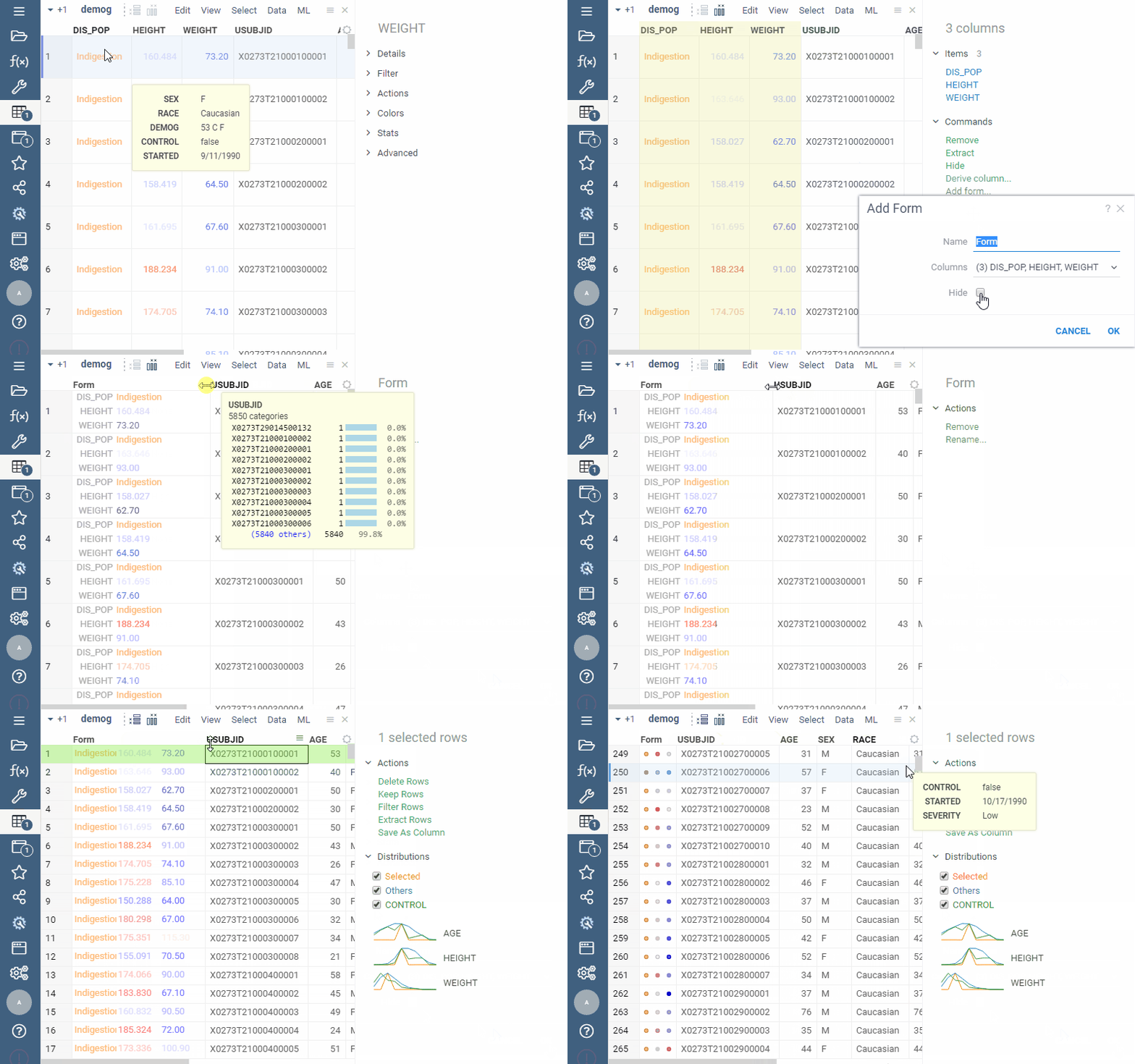
Q: Can I merge multiple columns into a single "form cell" that displays label-value pairs (e.g., cLogP: 2.09) for these columns as a formatted list within that cell?
Yes. Use smart forms.
See visual
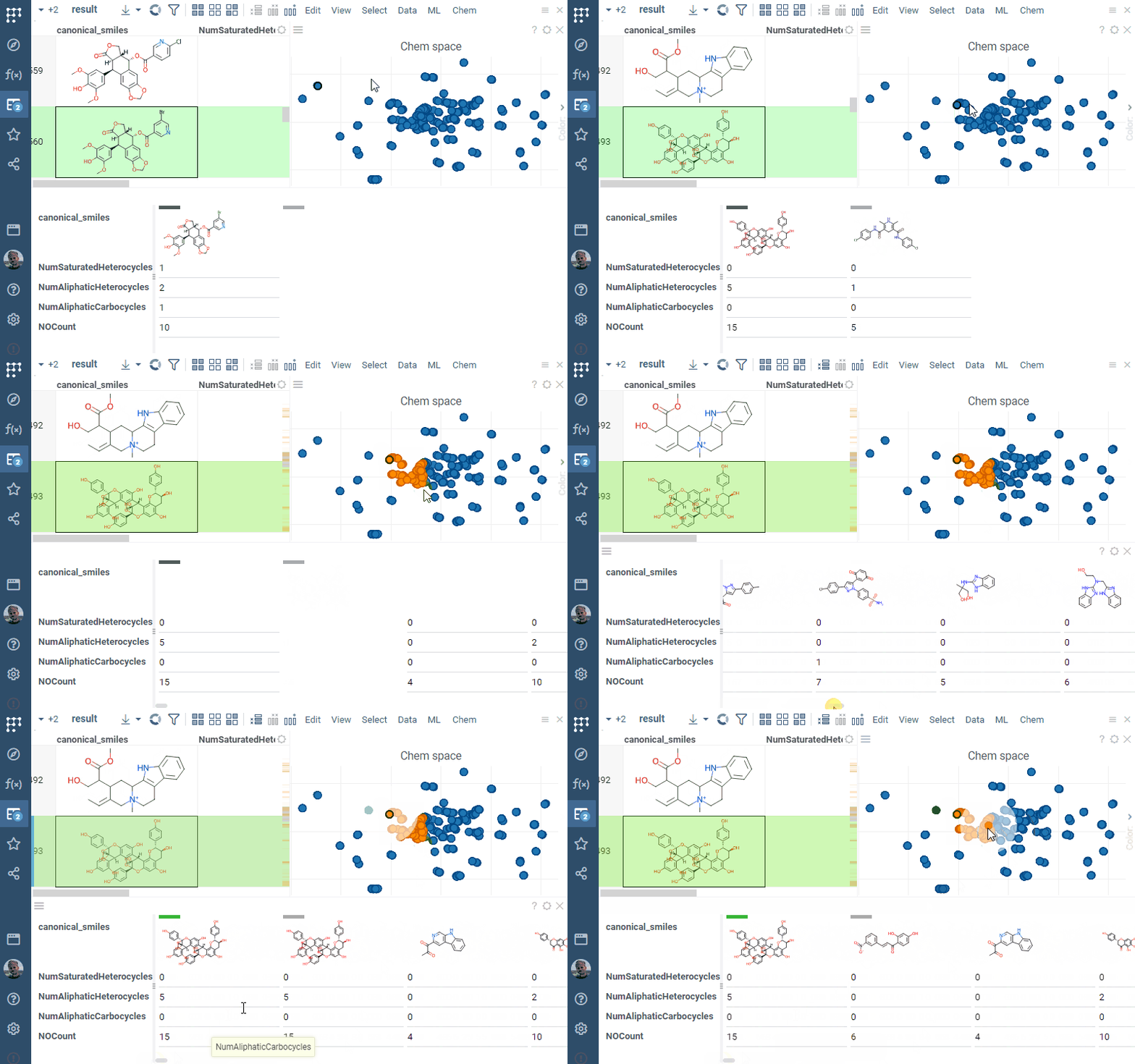
Q: Can I pivot a table so each object (e.g., molecule) becomes a column and values (e.g., molecular properties) appear as rows?
Yes. Use Forms viewer.
See visual
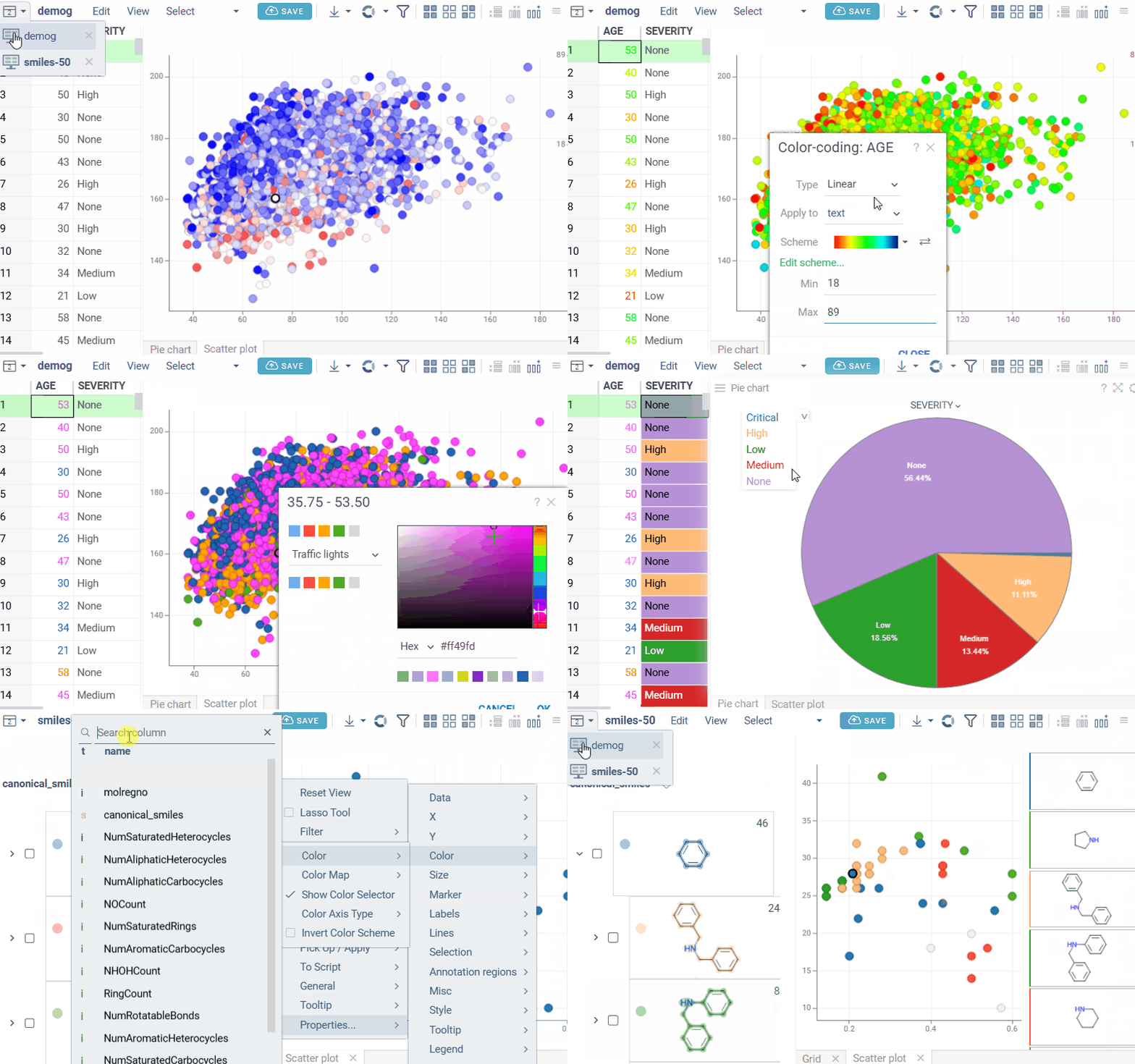
Q: How does color coding work in Datagrok?
Datagrok supports several color coding modes applied at the column level, with colors automatically synchronized across viewers:
- Linear: Maps numeric values to a color gradient. You can configure the color palette, min/max values, below/above min colors, and invert the scheme. Absolute Linear mode allows assigning exact colors to specific numeric values.
- Conditional: Applies colors based on value ranges or rules. You can configure the rules dictionary (ranges or comparison operators) and choose whether to apply colors to text or background.
- Categorical: Assigns colors to categorical values (strings, booleans). You can configure the category-to-color map, fallback color, and select the color scheme via UI or API.
- Linked: Applies color coding based on values from another column, regardless of the data type of the target column. This allows visually correlating columns by reusing the color scheme of a reference column. By default, the first column is used as the reference; you can assign a different linked column in the color-coding settings.
Domain-specific color coding: For chemical data analysis, the Scaffold tree assigns colors to scaffold structures that can be used as the color source in scatterplot. Scaffold colors follow inheritance rules where child nodes inherit parent colors unless explicitly overridden.
Color coding remains consistent across the grid and all viewers that reference the same column. Color coding persists in saved projects and layouts.
See visual
Filtering & search
Q: Are my filters saved with the dashboard?
The filter panel's state is part of the layout, so a saved dashboard reopens with it. To keep several filter sets for one table, save them by name in the filter panel's context menu under Save or Apply. These presets are stored in your browser only and don't travel with the dashboard or to other users. See Saving a filter configuration.
Q: How can I search and filter data quickly and intuitively?
Datagrok provides advanced and intuitive search and filtering capabilities:
- Global platform search
- Dataset-specific search and filtering
- Chemical/biological property filters (B/D/L-numbers, HELM notation, MW, OEB). See Filters and Calculators
- Substructure/SMARTS search for specific substructures within datasets using substructure search or chemical cartridges
- Scientifically logical and searchable lists:
- Logical conditions (e.g.,
is not null) - Combined logic with
AND/OR - Date ranges and comparisons (
<,>) - Text substring and fuzzy matching
See Data filtering and search for detailed guidance
- Logical conditions (e.g.,
Collaborate
Q: Can users save and share custom dashboards, analyses, and visualizations in Datagrok?
Users can create projects that include data, analyses, and dashboards, then share them with others. Dashboards are dynamic and customizable.
Creating and managing projects | Creating dynamic dashboards
Q: How can I link raw data, metadata, and analysis results to compounds or sequences so that this information can be easily recalled and shared across Datagrok dashboards?
The Sticky meta feature allows tagging compounds, sequences, or other entities with meta-information, such as calculated properties, analysis results, or comments. Tagged information can be recalled anywhere in Datagrok when the same entity appears, supporting collaborative workflows and effective communication between team members.
Q: Can users subscribe to notifications about new or updated data in Datagrok?
Datagrok keeps you informed about relevant activity. See Collaborate, Notifications, and Discussions.
Q: Can colleagues see my notes about the molecules, experiments, or other objects?
Yes. With sticky meta, you can add comments, ratings, tags, or other metadata to any object in Datagrok (molecules, experiments, samples, users, etc.). These annotations automatically follow the object across the platform. So if you leave a note on a molecule in one table, your collaborators will see the same note when that molecule appears in a different table or dataset.
Projects and dashboards
Q: Data sync: should I turn it on?
Turn it on when the dashboard must show current data and its audience has access to the database connection behind it. Turn it off for reports and snapshots that must stay as they were, or when the audience can't be given access to the source. See the comparison in Data sync.
Q: How do I make a "version" of a dashboard before changing it?
Datagrok keeps no version history for projects. Click SAVE > Save a copy before a risky change, name the copy for its purpose, and keep the layout in the gallery with View > Layout > Save to Gallery. See Versioning.
Q: What is the difference between linking and joining tables?
Joining produces one wider table. Linking keeps both tables and synchronizes the current row, selection, or filter between them through key columns. Use a join when you want a single flat table to chart, and a link when the detail side has many rows per master row and you want to browse them. See Join or link.
Q: How do I show the details of the current row from another table?
Link the tables with the row to filter link type. Clicking a row in the master table then filters the detail table. To show the details inside the master grid, right-click a cell in the master table (the source of the link) and select Add > Linked Tables. See Master-detail.
Q: Why did the column order change after a refresh?
The grid restores the saved order by column name. The order isn't saved for tables with more than 1,000 columns, and pivoted results order new columns by first appearance. Sort in the query for a stable order.
Q: What happens when I delete a dashboard?
It is removed for all users and can't be undone. Tables it owns go with it. Queries and linked tables stay, because they belong to other entities. To take a dashboard out of a space without deleting it, move it to another space. See Retire.
Develop
Architecture
Q: How is Datagrok architected?
Datagrok is built as a modular, service-oriented platform with client-server separation.
Learn more about Datagrok's architecture
Interoperability
Q: Can Datagrok call external web services?
Yes, both client and server can call authenticated web services and integrate responses with the Datagrok API. See Developer guide for details
Q: How do I interact with Datagrok from the server?
Use Datagrok’s REST server API with authentication tokens.
See Proof of concept video for more information
Q: How do I interact with Datagrok from the client?
Use the JavaScript API for custom applications and extensions.
Learn more about JavaScript API
Developer experience
Q: Does Datagrok support programmatic integration through customized scripts and APIs?
Datagrok provides robust capabilities for programmatic integration:
- Scripting: users can automate tasks and extend functionality using JavaScript or Python scripts. See Scripting
- APIs: Datagrok provides two primary types of APIs: JavaScript and Python. See API
- Develop: the platform supports the development of custom plugins and modules to enhance its capabilities. See Develop
Q: How do I develop and debug Datagrok customizations?
Follow the step-by-step guide for creating your own package. If your package is based on a non-standard template, you may need to configure it differently for debugging. See also a debug demo for details.
Q: How does Datagrok handle package development and deployment?
The process includes package deployment, dependency management, and versioning.
See Developer guide for details
Q: Can multiple developers work concurrently?
Yes, with versioning, branching, and package management.
Learn more about Concurrent development
Q: Are Datagrok’s functions and APIs well documented?
Datagrok provides detailed documentation for all functions and APIs to help developers integrate, automate, and extend the platform. See APIs.
Q: Does Datagrok provide support and training for users?
Datagrok offers extensive help, videos, community forum, self-guided learning, tutorials, and on-platform demos to help scientists gain familiarity and mastery of the platform.
Scalability and performance
Q: How stable is the platform under heavy load?
Datagrok is designed for horizontal scaling, ensuring stability with concurrent users.
See Scaling and stability for more information
Extensibility
Q: Can developers create custom visualizations?
Datagrok offers multiple options for creating and embedding custom visualizations:
- Custom viewers via JavaScript API
- Scripting viewers using R, Python, or Julia
- Third-party library integration (see Charts package)
- Custom file and folder viewers (e.g., PDB files via NGL viewer through the Biostructure Viewer package)
- Custom cell renderers
Q: Can I build server-side components?
Yes, custom back-end logic can be added.
See Admetica example
Q: Can I add scripts and reuse them in components?
Yes, Datagrok supports multiple scripting languages.
Learn more about Scripting
Q: Can I reskin Datagrok?
Yes, you can build tailored UI applications.
See Example app
Q: Can I build full custom applications?
Yes, including workflows, data models, state management, and persistence.
See Custom application packages
Frontend
Q: What frontend capabilities does Datagrok provide for scientific data analysis?
Datagrok delivers a high-performance, interactive frontend for handling, visualizing, and analyzing large-scale scientific datasets. Key capabilities include:
- Data capacity and client-side handling – load and explore millions of rows directly in the browser using Datagrok’s in-memory data engine. Supports high-throughput and virtual screening scenarios with GPU-accelerated visualizations.
See also: Example: 2.7M ChEMBL molecules | WebGPU acceleration - Cross-connecting multiple large data tables – perform sophisticated data manipulation including joins, filters, and aggregation. Linked tables enable interactive cross-referencing across datasets.
Learn more about Transformations - Visualization capabilities – Over 50 interactive viewers for synchronized dashboards, including chemically-aware viewers
- 2D/3D structure rendering and interaction.
See Cheminformatics for details - Interactivity features – live data masking, filter by selection, synchronized updates across viewers, multiple input methods including 2D sketching.
See Common actions, Structure search, and Sketching and editing for details - API integration and extensibility. See JavaScript API for details
- Frontend scripting scalability. See Compute for details