Multiparameter optimization
Multiparameter optimization (MPO) helps you rank and prioritize compounds by combining multiple properties into a single composite score. You define how each property maps to a 0–1 desirability scale, assign weights, and aggregate the results. MPO is especially useful in medicinal chemistry, where potency, solubility, permeability, clearance, and safety must all stay within acceptable ranges.
This page covers MPO profiles, desirability curves, scoring, and visualization tools available in Datagrok.
Profiles
An MPO profile defines which properties to evaluate, how to shape their desirability curves, and how to aggregate the results into a final score. Datagrok includes built-in profiles (such as the Pfizer CNS MPO) and lets you create your own.
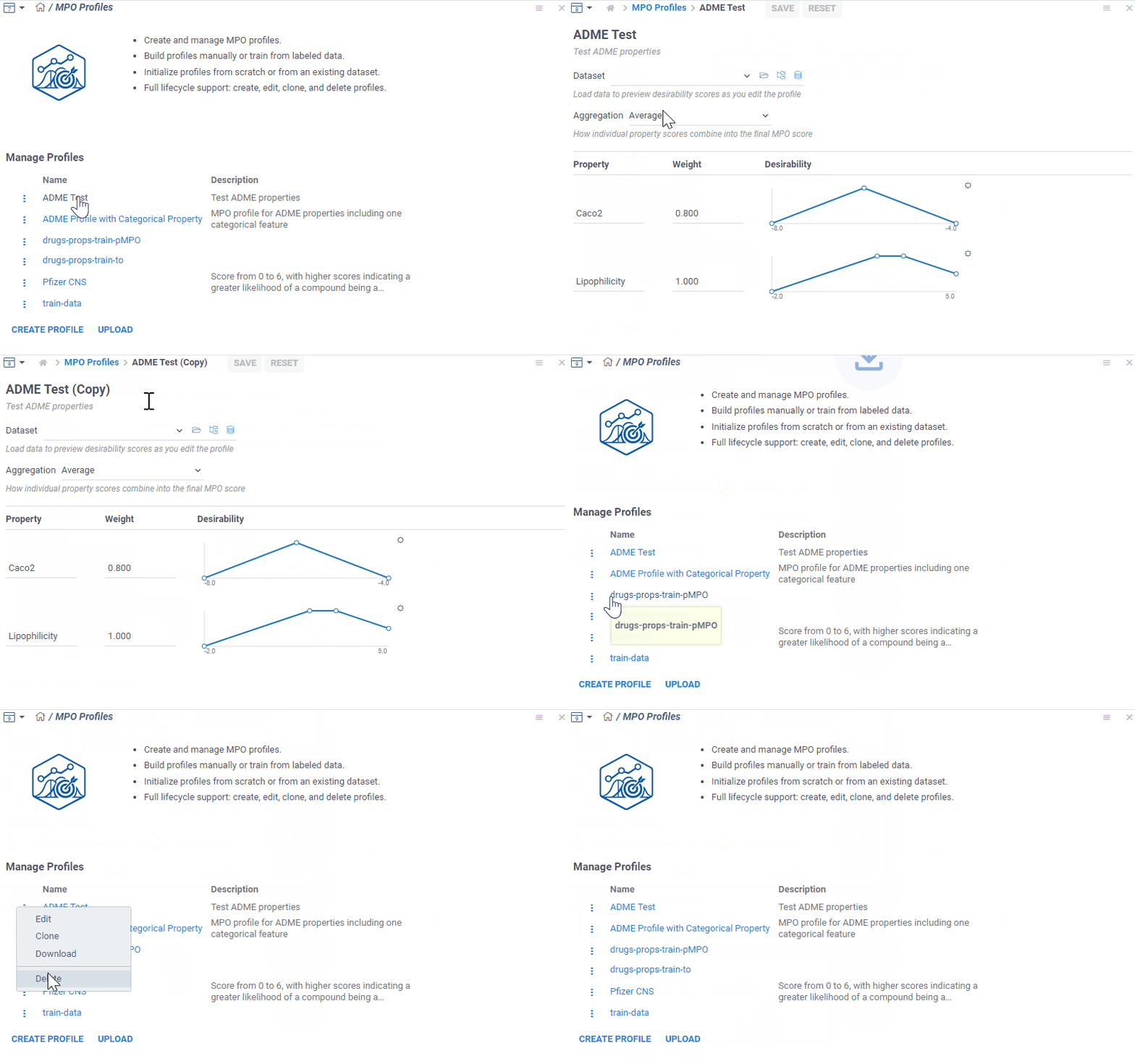
To manage profiles, select Apps > Chem > MPO Profiles. From here, you can:
- Create a new profile
- Edit an existing profile
- Clone a profile
- Delete a profile
- Download a profile as JSON
- Upload a previously saved profile
Create a profile
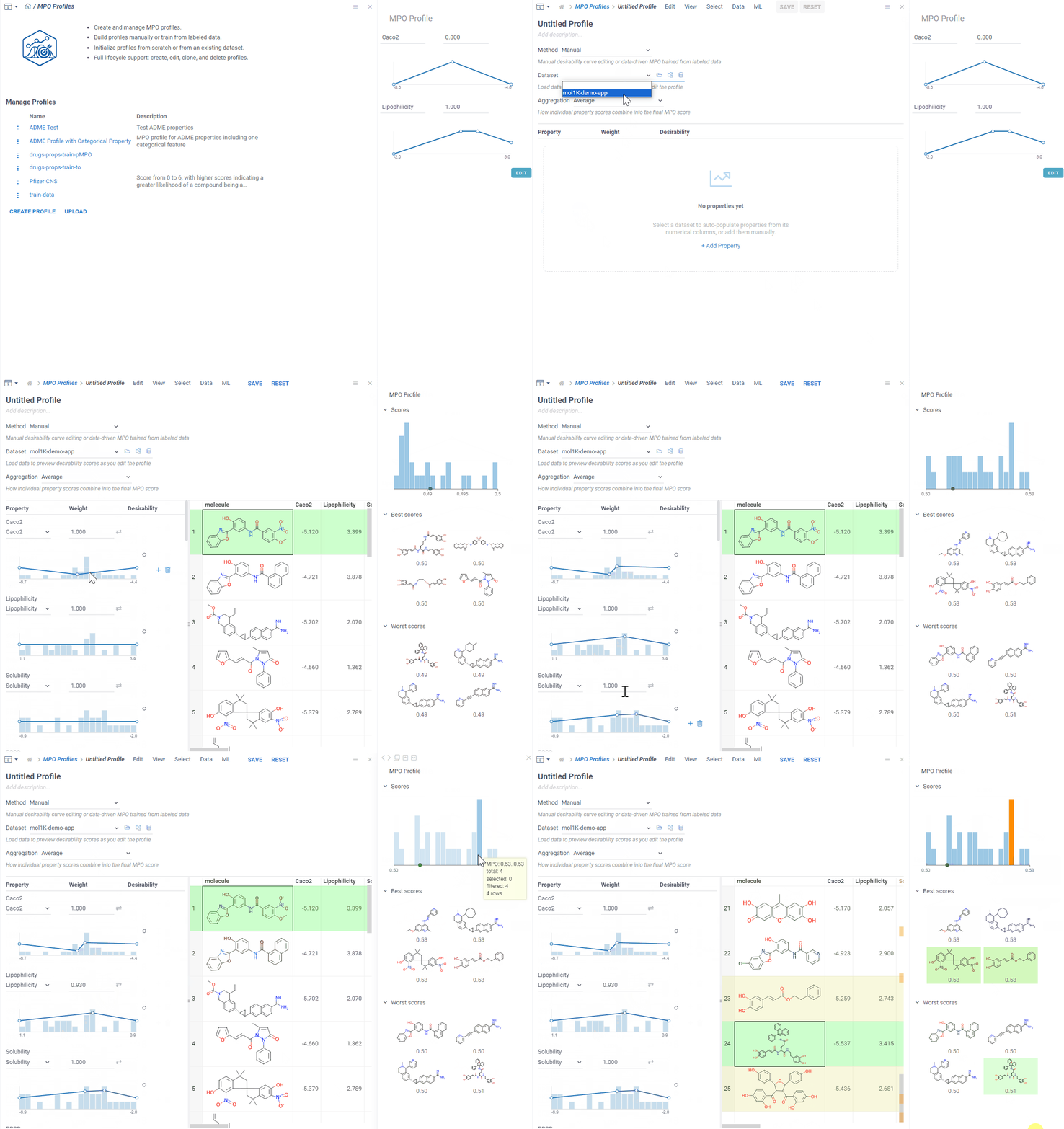
To create a new profile, click Create Profile. A dedicated view opens where you can:
- Add properties and shape their desirability curves.
- Track changes in real time via the context panel (score histogram, best and worst scoring molecules).
- Add computed functions for properties missing from the dataset.
Desirability curves
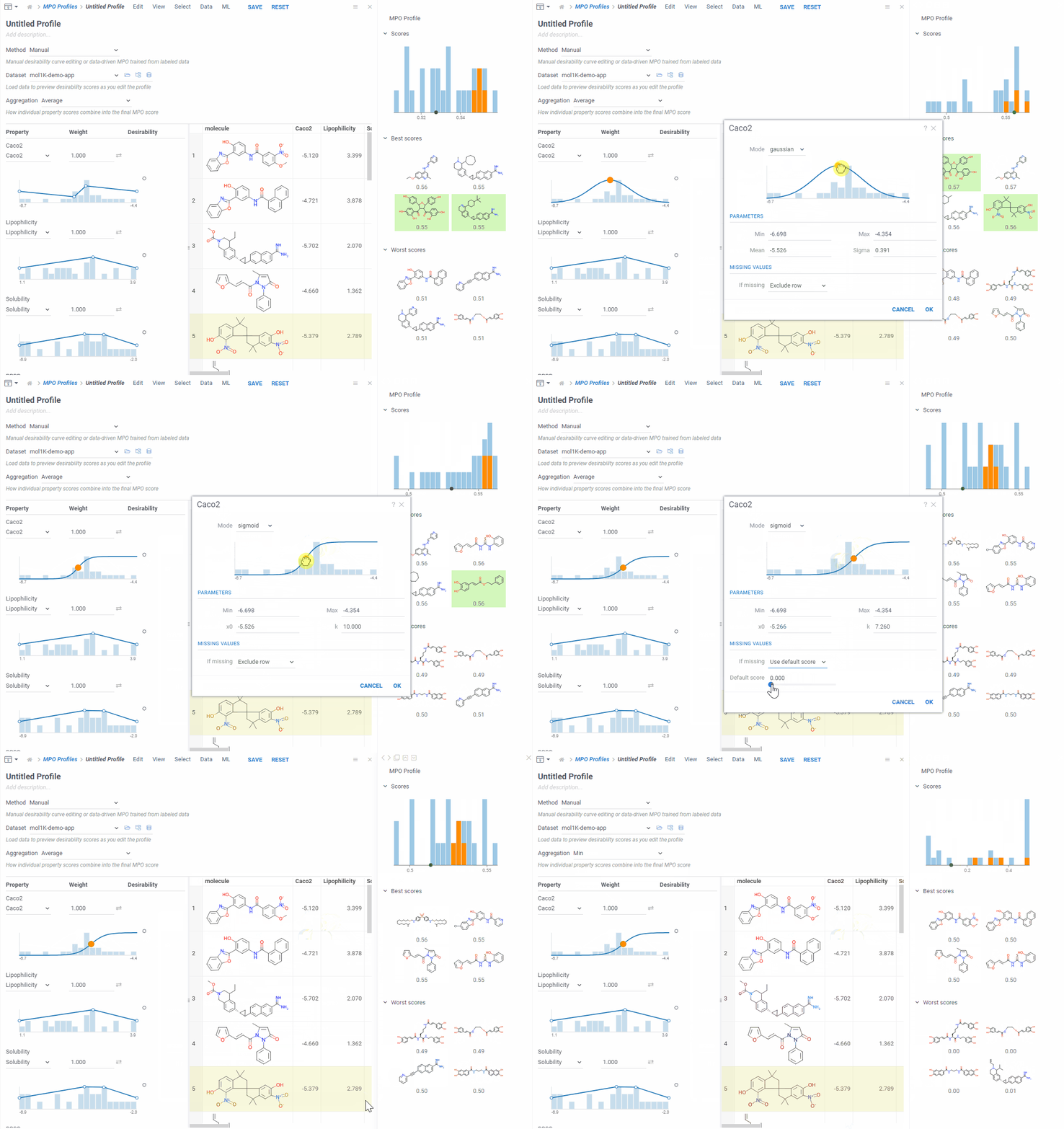
Each property maps to a 0–1 desirability scale using one of three curve types:
| Curve type | Description |
|---|---|
| Freeform | Draw a custom curve by placing control points |
| Gaussian | Bell-shaped curve centered on an optimal value |
| Sigmoid | S-shaped curve for monotonically increasing or decreasing desirability |
Categorical properties
For categorical properties (such as compound class or assay outcome), you assign a desirability score to each category directly instead of drawing a curve.
Missing values
You can configure how the profile handles missing property values:
| Option | Behavior |
|---|---|
| Skip row | Exclude the compound from scoring |
| Use fallback score | Assign a default desirability value |
| Ignore property | Score the compound using the remaining properties |
Aggregation
Combine individual desirability scores into a final MPO score using one of these methods:
- Average
- Sum
- Product
- Geometric mean
- Min
- Max
You can also assign weights to individual properties to reflect their relative importance.
Built-in profiles
Datagrok includes the Pfizer CNS MPO profile by default. It combines six physicochemical properties into a 0–6 score that correlates with clinical CNS drug success.
Data-driven mode
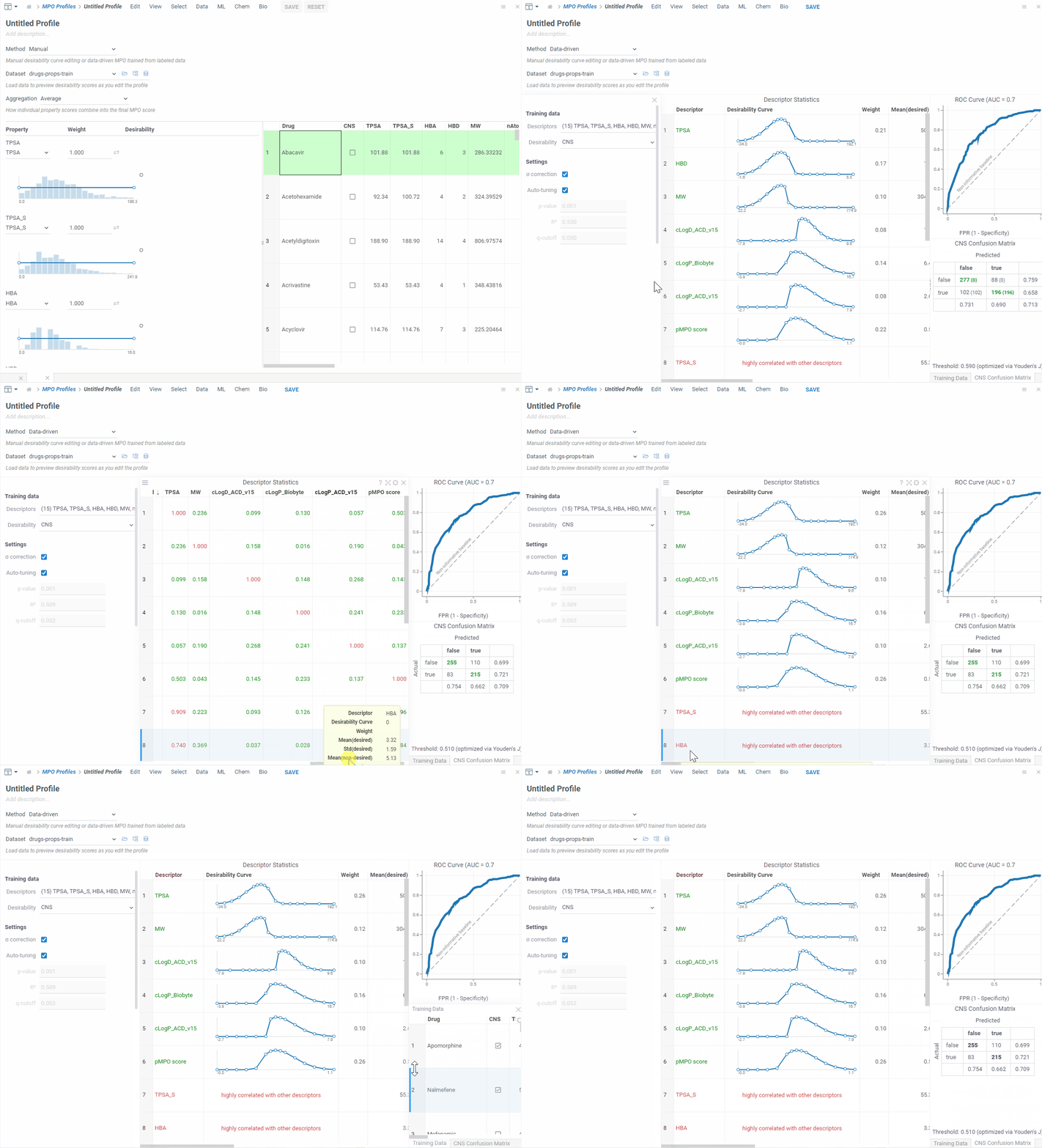
Instead of designing desirability curves by hand, the data-driven approach learns them from a labeled dataset. You label each compound as preferred or not — based on assay results or expert judgment — and Datagrok finds the properties that best separate the preferred compounds from the rest, shapes a desirability curve for each, and weights them by how strongly they discriminate. The result is a ready-to-use MPO profile, along with a ROC curve and confusion matrix that show how well it separates the two groups.
Use this when you have a trusted dataset with known outcomes and want a profile without tuning each curve by hand. The approach is based on a published probabilistic, data-driven MPO method.
How it works
Starting from your labeled data, the method:
- Splits the compounds into two groups — preferred and not preferred — based on the label column.
- Selects the properties that best separate the two groups, and drops properties that are redundant (strongly correlated with a more informative one).
- Shapes a desirability curve for each selected property so it peaks where preferred compounds cluster and falls off toward values typical of the rest.
- Weights each property by how strongly it distinguishes preferred compounds from the rest, so the most informative properties carry the most influence.
- Combines the weighted curves into a single score, then reports a ROC curve, its area under the curve (AUC), and a confusion matrix so you can judge the result.
Build a data-driven profile
- Open a table that includes molecular descriptors and a column labeling each compound as preferred or not.
- Go to Apps > Chem > MPO Profiles and click Create Profile.
- Set Method to Data-driven, choose your Dataset, and select the column that defines desirability (boolean, numeric, or categorical).
- Review the results: the trained desirability curves, the descriptor statistics, the
pMPO scorecolumn, the ROC curve, and the confusion matrix. - Save the profile. It then appears alongside your other MPO profiles, ready to apply.
To score compounds with a saved profile, use MPO Score, just like any other profile.
Data-driven vs. manual
| Manual | Data-driven | |
|---|---|---|
| Properties | You add each one | Selected automatically from the data |
| Curve shape | You pick Freeform, Gaussian, or Sigmoid and edit points | Derived from the preferred group's distribution |
| Weights | You set each weight | Set automatically from each property's discriminating power |
| Validation | Score histogram, best and worst molecules | ROC curve, AUC, confusion matrix, descriptor statistics |
| Requires | Any numeric columns, no label | A labeled dataset with at least 10 samples |
The data-driven approach needs the EDA package installed, plus a trusted labeled dataset with at least 10 samples and at least one property that separates the groups. If no property qualifies, or the label has only one category, you'll see Data-driven MPO is not applicable for this dataset. A saved data-driven profile is an ordinary MPO profile — curves plus weights — so you can edit it and re-score it through MPO Score like any hand-built profile.
Scoring
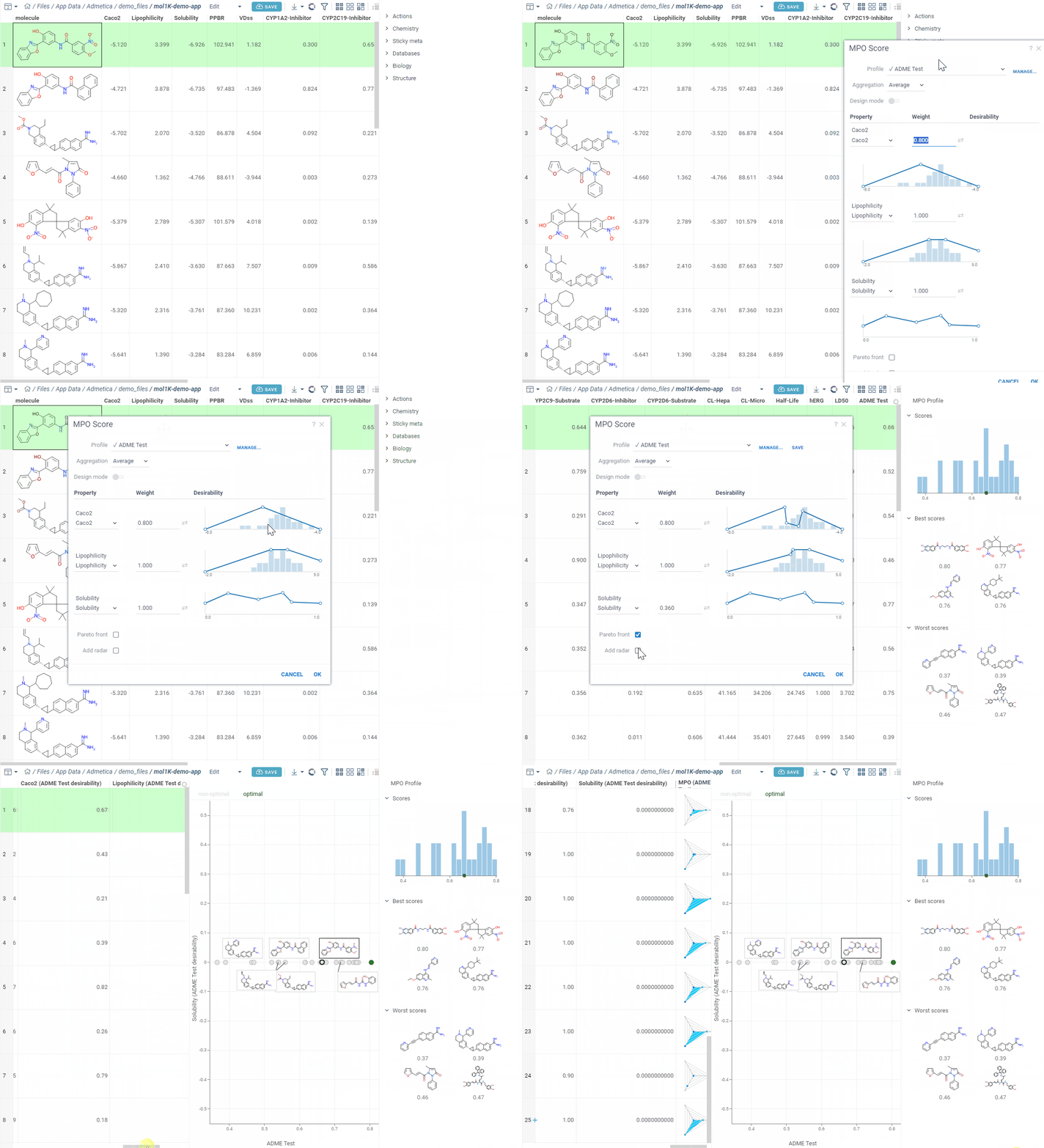
To score compounds against a profile, select Chem > Calculate > MPO Score. Compatible profiles display a checkmark (✓) indicator.
Visualization
After scoring, you can use several tools to explore the results:
- Sort by MPO score to identify top candidates.
- Radar charts show per-property score breakdowns directly in the grid.
- Pareto front toggle highlights compounds where no property can improve without worsening another. For details, see the Pareto front viewer.