Timelines
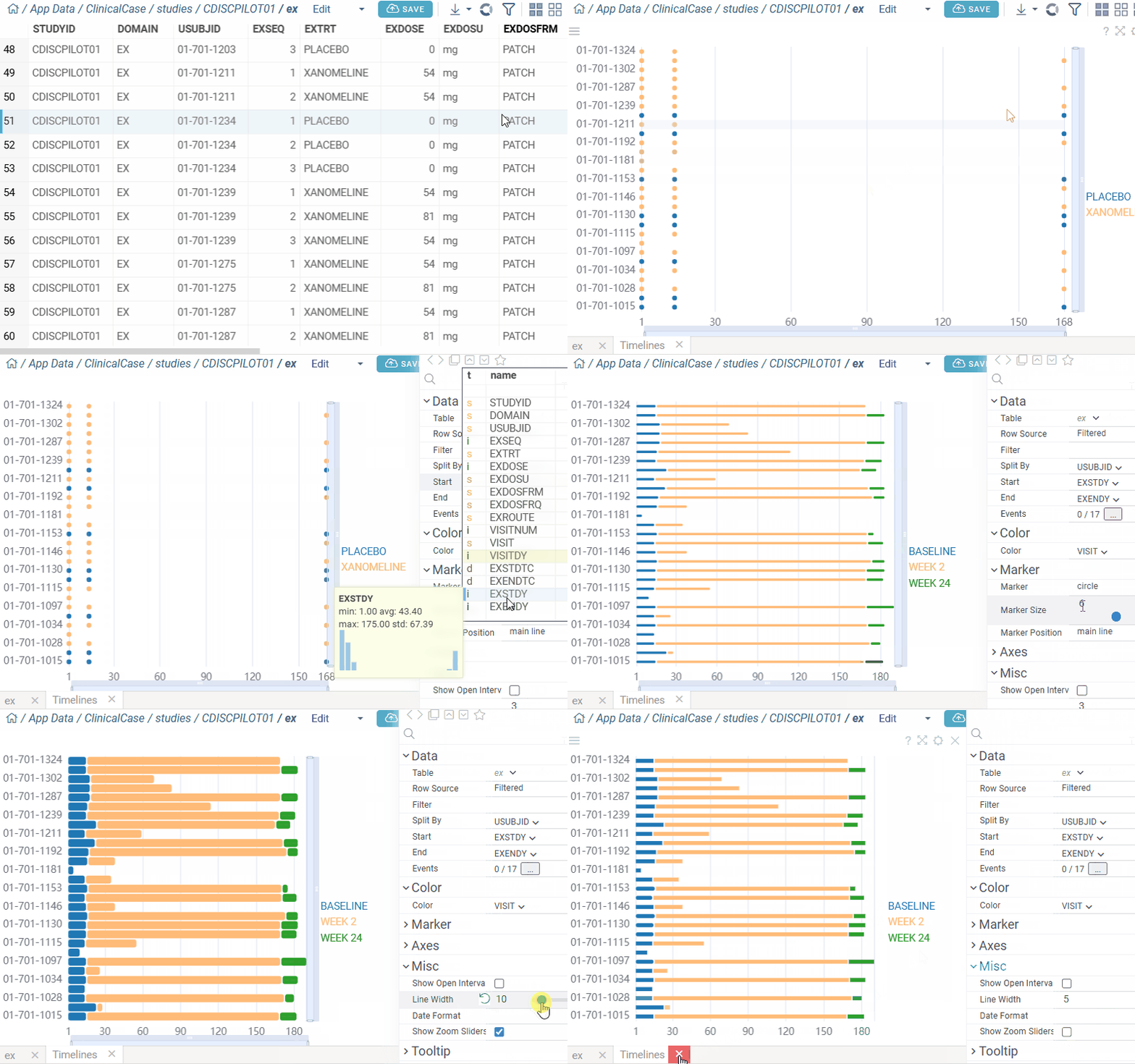
Timelines viewer displays the flow of events over time. Each row represents a subject, with events shown as bars or points along the time axis. The viewer is commonly used for clinical data visualization.
Note: To use a timelines viewer, install the package Charts.
Create a timelines viewer
- On the menu ribbon, click the Add viewer icon. A dialog opens.
- In the dialog, select Timelines.
developers
To add the viewer from the console, use:
grok.shell.tv.addViewer('Timelines');
note
You can use this viewer with clinical data. When you add a timelines viewer, it automatically selects appropriate columns based on SDTM vocabulary and data characteristics.
Configuring a timelines viewer
To customize a timelines viewer, click the Gear icon on top of the viewer and use the Context Panel to adjust its settings.
For example, you can:
- Group events vertically by subject or category using Split By.
- Show event durations along the timeline with Start and End columns.
- Display single-point events as markers using Events.
- Include events with missing dates by enabling Show Open Intervals.
- Color-code events by selecting a column in Color.
- Show detailed event info in tooltips with Event and Show Event In Tooltip enabled.
- Customize marker appearance:
- Change shape with Marker
- Adjust size with Marker Size
- Set placement with Marker Position (
main line,above,scatter).